01 · Overview
What rbAmp is
rbAmp is a compact hardware module for precision measurement of AC mains parameters over the I²C interface. It is built around a microcontroller with an integrated isolated analog front-end and factory calibration stored in flash.
From an integrator's point of view the module behaves like a standard
I²C slave: you create RbAmp(bus, 0x50), call dev.begin(), and
get ready-to-use values through properties / methods. The same
source runs on MicroPython (with machine.I2C) and CPython
(with smbus2) — the backend is selected automatically from the
type of the bus object.
Terms used in these docs
- Module line — BASIC or STANDARD (STD): the product line of the module (see 02).
- Variant — UI1, UI2, UI3, I1, I2, I3 (and UI5/UI7): how many current channels, and whether the module has a voltage input.
- Firmware version / module image version — the software inside the module; some STD calls need a recent enough image.
- RT reading — an instant reading (voltage, current, power), refreshed by the module every 100 ms.
- Period / snapshot — a snapshot freezes the totals of the period so far and starts the next one; a period snapshot is the frozen result (average power per channel).
- Stale snapshot — the module had no fresh snapshot ready; the library raises
RbAmpStaleErrorand the next good snapshot covers the whole interval. - Primer — the first snapshot taken by
begin(); it discards what accumulated since power-up. - GC (General Call) — one broadcast I²C frame that makes several modules take their snapshot at the same instant.
- DRDY — optional pin that pulses every ~100 ms when new RT data is ready.
One module or many
One module or many: start with one RbAmp; use RbAmpFleet for several.
The rbamp Python package works with a single module and also with a
group of modules on a single I²C bus. The canonical multi-module scenario is one master module at the
mains feed plus N modules on individual loads, all on one bus,
driven by a single ESP32 / RPi / SBC. The library provides the
RbAmpFleet class — a single object through which you scan the
bus, poll all modules in one call, get total power and the
"feed − Σ(consumers)" balance, catch errors on each module, and, when
needed, synchronize period snapshots with a broadcast command.
Multi-channel modules are also supported — the current-only I2 /
I3 (two or three CTs) and the voltage-equipped UI2 / UI3 / UI5 /
UI7 (2 / 3 / 5 / 7 current channels, with power, PF and Wh per channel).
Each channel has its own sensor model. This is typical for a sub-panel,
where a single installation point monitors several feeders.
Working with a single module is the minimal case of the same
library: the RbAmp class is the building block on which
RbAmpFleet is layered. If you have one module on the bus, you use
that same handle directly — the fleet API is not needed.
The 80% scenario — mains + N sub-loads

- 1 module at the feed (mains) — total consumption and grid quality.
- N modules on individual loads — per-channel metering.
- Multi-channel modules fit this case too: one
UI2/UI3/UI5/UI7(orI2/I3) can meter several loads, each on its own channel — N modules do not have to mean N loads. - A single
fleet.poll_all()call polls everything; the balancemains − Σ(sub_loads)shows "the rest" (background consumption, unmetered loads, leakage). - One shared master timestamp → correct Wh metering with no inter-module drift.
Important architectural detail. The I-variants (
I1/I2/I3) measure current only — they have no voltage, active power, or PF. Active energy (Wh) and power are computed only on the UI-variants (which have a voltage front-end). In the canonical deployment, the "mains-meter" role (metering energy) is played by a single UI1 at the mains feed; the sub-meter role (per-load current detail) is played by I2/I3 modules (or by UI2 / UI3 / UI5 / UI7 when power and Wh are needed per load).
For details, see chapter 06 · Examples, scenario 1 ("Mains + N sub-loads — the 80% canon"). For the API, see chapter 09 · API Reference, section "Fleet manager".
What rbAmp measures
| Quantity | Python type | Range |
|---|---|---|
| RMS voltage U_rms | float, V |
0…300 V |
| Peak voltage U_peak | float, V |
0…450 V |
| RMS current I_rms | float, A |
depends on the selected sensor — see 03_sensor_selection.md |
| Peak current I_peak | float, A |
depends on the selected sensor |
| Active power P (signed in RT) | float, W |
depends on the selected sensor |
| Power factor PF | float |
−1…+1 |
| Mains frequency | int, Hz |
50 / 60 Hz (detected) |
| Period-averaged P | float, W |
same as P |
The RT value of active power
Pis always signed on any module line (negative means export to the grid). The behavior of the period-averaged value (snap.avg_p[ch]inRbAmpPeriodSnapshot) depends on the module line — see the "Module lines" section below and 02_tiers.md.
Wiring
The module connects to the host with four wires on the LV side. The mains side is already routed inside the enclosure and is galvanically isolated.
| Wire | Purpose |
|---|---|
VCC |
+5 V (4.5..5.5 V), current ~15 mA, peak ~25 mA |
GND |
common with the host (required) |
SDA, SCL |
I²C, 3.3 V logic, 5 V-tolerant. Built-in pull-ups 4.7 kΩ |
DRDY |
optional, open-drain LOW ~10 µs every ~100 ms |
The default address is 0x50 (7-bit, change range 0x08..0x77).
The recommended speed for MicroPython on ESP32 is 50 kHz; for
CPython through the kernel I²C it is usually 100 kHz (the NACK
pattern does not appear through the Linux kernel API).
The full rules (bus length, pull-up recommendations on a multi-module bus, wiring diagrams for RPi / ESP32 / RP2040 / STM32) are in chapter 04 · Wiring.
Module lines (quick cheat sheet)
BASIC and STANDARD (STD) modules are shipping; STANDARD is supported by this library from 1.6.0.
BASIC is one-directional (consumption-only) metering following the logic of a classic mechanical meter:
| Module line | RT power dev.power[ch] |
Period accumulator snap.avg_p[ch] |
Package Wh counter |
|---|---|---|---|
| BASIC | signed (negative = export to the grid, visible in real time) | each 100 ms window of average P is clamped to max(P, 0) before being added to the period accumulator |
monotonic — consumption-only metering |
| STANDARD (STD) | signed | same calls as BASIC; the source is the module's energy counters or latch bank 0, chosen at begin(); energy is net (export subtracts) |
dev.energy integrates the period; the module's own totals: read_std_energy() (see chapter 02) |
For details, see chapter 02 · Module lines. At the
package level the same RbAmp class is used regardless of module line; the
differences show up in the values the module returns.
Bidirectional metering on BASIC:
dev.energy.wh(ch)on the BASIC module line gives consumption only. If you need to account for export separately, sample the RT powerdev.power[0](ordev.read_power(0)) at ~10 Hz and split the positive and negative samples into two accumulator variables yourself. For an example, see 06_examples.md, scenario "Bidirectional metering on the master side".
What this package does
The main job is to hide the protocol exchange and relieve user code
of the routine of working with registers, byte order, and settle
times after commands. In addition, the package computes energy
(Wh) — the module returns only the period-averaged power, and the
master does the integration using time.monotonic() /
time.ticks_us().
Without the package (direct register access via smbus2)
import struct
from smbus2 import SMBus, i2c_msg
# Read U_RMS — burst-read 4 bytes (auto-increment is supported on reads).
with SMBus(1) as bus:
    buf = bytes(bus.read_i2c_block_data(0x50, 0x86, 4))
u_rms = struct.unpack("<f", bytes(buf))[0]
With the package
from smbus2 import SMBus
from rbamp import RbAmp
with SMBus(1) as bus, RbAmp(bus, 0x50) as dev:
    dev.begin()
    u_rms = dev.voltage          # property (one call = one transaction)
    # or: u_rms = dev.read_voltage()
Reading a period — without the package
import time, struct
with SMBus(1) as bus:
    # Snapshot + 50 ms settle + ready-flag check + assemble 4 bytes of avg_p
    bus.write_byte_data(0x50, 0x01, 0x27)   # REG_COMMAND, CMD_LATCH_PERIOD
    t_latch = time.monotonic()
    time.sleep(0.050)                        # settle
    bus.write_byte(0x50, 0x07)
    if bus.read_byte(0x50) & 0x01 == 0:
        # snapshot is stale — keep the previous t_prev_latch, so the next
        # good snapshot covers the full interval
        raise SystemExit("stale snapshot")
    # ...read 4 bytes of avg_p, struct.unpack, integrate Wh:
    #   dt_s = time.monotonic() - t_prev_latch
    #   E_Wh += avg_p * dt_s / 3600
Reading a period — with the package
with SMBus(1) as bus, RbAmp(bus, 0x50) as dev:
    dev.begin()
    snap = dev.read_period_snapshot()        # snapshot + settle + valid + read + Wh tick
    print(snap.avg_p[0], "W")
    print(dev.energy.wh(0), "Wh")
Internally the package guarantees:
- A 50 ms settle after
CMD_LATCH_PERIOD, and a correct snapshot read. - A
validflag check before reading; on a stale snapshot it raisesRbAmpStaleError. - Keeping the previous timestamp on a stale snapshot, so the next good snapshot covers the full interval and Wh stays exact.
- Per-channel Wh accumulation in double precision (CPython — 64-bit
float; MicroPython — depends on the build, see 04 · Wiring). - Automatic loading of calibration coefficients when the current
sensor is selected via
dev.set_sensor_class(cls)+dev.set_ct_model(code)— the user does not need to know about the internal calibration registers.
When to use the package, when to use direct bus access
| Task | Package | Direct access via smbus2 / machine.I2C |
|---|---|---|
| Reading U / I / P / PF / frequency | ✅ | only for debugging on a logic analyzer |
| Per-period energy metering | ✅ | only if Wh are stored outside the package (e.g., in a DB on the master side) |
| Several modules on one bus | ✅ (via sequential snapshot + shared settle) | — |
| Bidirectional metering on BASIC | ✅ (via RT reads — see 06_examples.md) | alternative — your own RT-read loop |
| Async streaming via asyncio / uasyncio | ✅ (async for snap in dev.stream_period()) |
hard — no built-in async wrapper |
| Porting to another platform | n/a | ✅ — see rbamp-docs (register map and protocol) |
For all the typical tasks in the first rows, the package is the way to go.
Architecture

┌─────────────────────────────────────────────────────┐
│  User code (.py)                                    │
│   from smbus2 import SMBus                          │
│   from rbamp import RbAmp, RbAmpSensorClass         │
│   with SMBus(1) as bus, RbAmp(bus, 0x50) as dev:    │
│       # __enter__ calls dev.begin() itself;         │
│       # explicit begin() shown for transparency     │
│       dev.set_sensor_class(RbAmpSensorClass.SCT_013)│
│       dev.set_ct_model(3)                           │
│       snap = dev.read_period_snapshot()             │
│       dev.energy.wh(0)                              │
└─────────────────────────────────────────────────────┘
                       │
                       ▼
┌─────────────────────────────────────────────────────┐
│  Public API of the RbAmp class (rbamp/__init__.py)  │
│   ┌─────────────────────────────────────────────┐   │
│   │ Lifecycle:      begin / probe / wait_ready  │   │
│   │ RT properties:  .voltage / .power[ch] /     │   │
│   │                 .current[ch] / .frequency   │   │
│   │ RT methods:     read_voltage / read_power / │   │
│   │                 read_all                    │   │
│   │ Period:         latch_period /              │   │
│   │                 read_period_snapshot        │   │
│   │ Async:          stream_period               │   │
│   │ Configuration:  set_sensor_class /          │   │
│   │                 set_ct_model                │   │
│   │ Diagnostics:    retry_exhaustion_count /    │   │
│   │                 sanity_reject_count         │   │
│   │ Exceptions:     RbAmpError → IOError /      │   │
│   │                 TimeoutError / StaleError / │   │
│   │                 ParamError / ModeError /    │   │
│   │                 VersionError                │   │
│   └─────────────────────────────────────────────┘   │
│                       │                             │
│                       ▼                             │
│   ┌─────────────────────────────────────────────┐   │
│   │ Backend selection (inside __init__):        │   │
│   │  bus.readfrom_mem  → MachineI2CBackend      │   │
│   │  bus.read_byte_data → SMBusBackend          │   │
│   │  duck-typed        → custom (FTDI / mocks)  │   │
│   └─────────────────────────────────────────────┘   │
│                       │                             │
│                       ▼                             │
│   ┌─────────────────────────────────────────────┐   │
│   │ Instance state:                             │   │
│   │  • RbAmpEnergy — Wh accumulator             │   │
│   │  • RbAmpSnapshot / RbAmpPeriodSnapshot      │   │
│   │  • Time of last snapshot (monotonic)           │   │
│   └─────────────────────────────────────────────┘   │
└─────────────────────────────────────────────────────┘
                       │
                       ▼
┌─────────────────────────────────────────────────────┐
│  Backend — native I²C on the host platform:         │
│   smbus2 (CPython)  /  machine.I2C (MicroPython)    │
└─────────────────────────────────────────────────────┘
                       │
                       ▼
┌─────────────────────────────────────────────────────┐
│  rbAmp module at address 0x50                       │
│   • U / I / P / PF measurement pipeline (~100 ms)   │
│   • Period accumulator (atomic CMD_LATCH_PERIOD)    │
└─────────────────────────────────────────────────────┘
Exception hierarchy
Unlike the Arduino library (where errors are reported via
lastError() + a return code) and the ESP-IDF component (where they
are reported via esp_err_t), the Python package uses the
classic Python pattern — an exception hierarchy.

The standard Python pattern:
from rbamp import RbAmp, RbAmpStaleError, RbAmpError
try:
    snap = dev.read_period_snapshot()
except RbAmpStaleError:
    # Snapshot is stale — the package keeps the previous timestamp, the next good snapshot covers the full interval
    continue
except RbAmpError as e:
    log.warning("rbAmp failure: %s", e)
Interaction diagrams
The dev.begin() flow
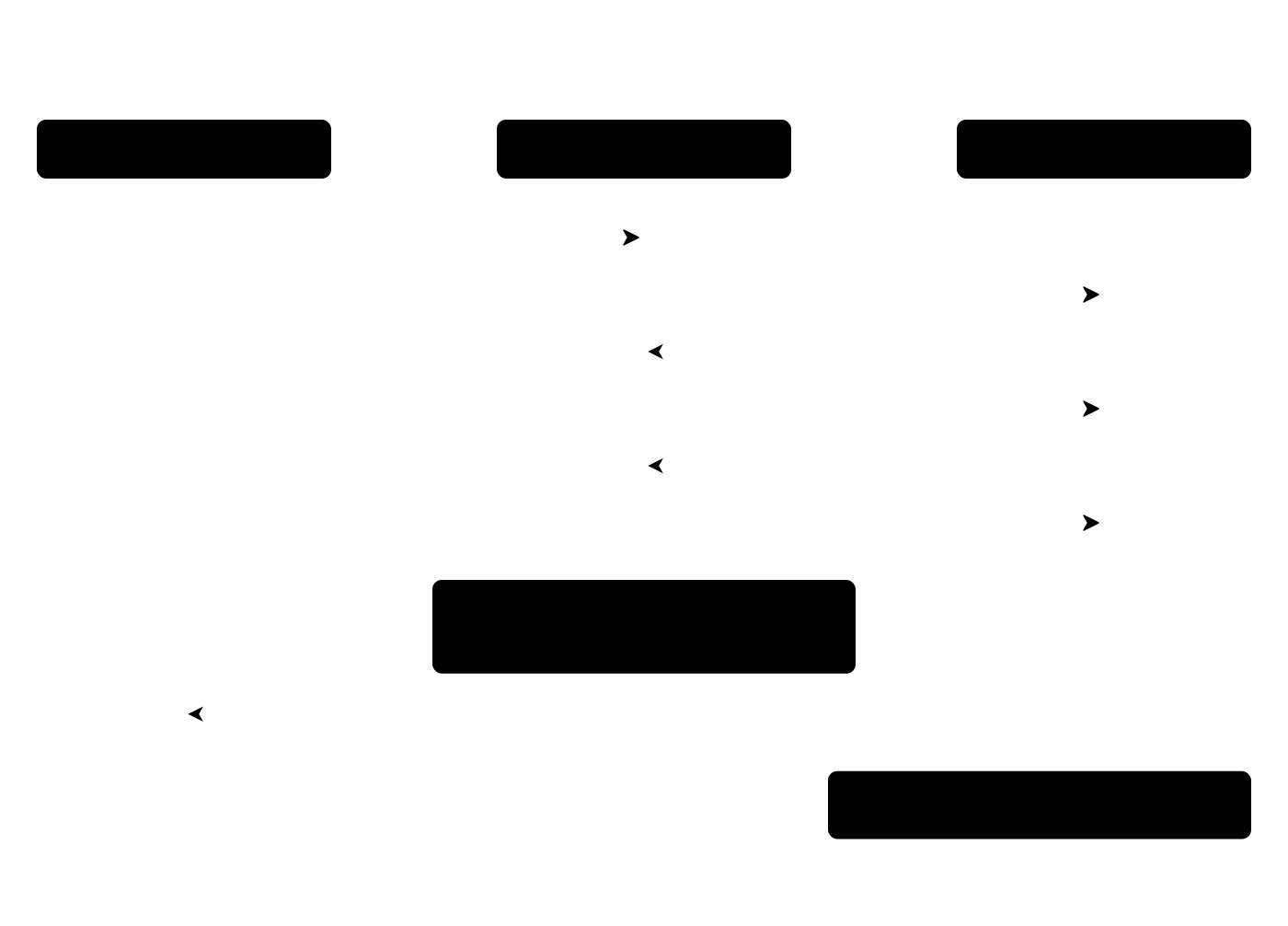
code          RbAmp                Backend             rbAmp module
  │             │                    │                       │
  ├─dev.begin()►                     │                       │
  │             ├─read_u8(REG_VERSION)►                      │
  │             │                    ├──[0x50, 0x03]────────►│
  │             │                    │◄────────────────ACK───┤
  │             │                    ├──[read 1 byte]───────►│
  │             │                    │◄──────────────[0x04]──┤
  │             │◄─────── version_byte ─────┤                  │
  │             │                    │                       │
  │             ├─read_float_le(U_RMS)►(4 single-byte reads) │
  │             │  → 226.3 V         │                       │
  │             │  → has_voltage_hw = True                   │
  │             │                    │                       │
  │             ├─write_cmd(LATCH)──►│                       │
  │             │                    ├──[0x50, 0x01, 0x27]──►│
  │             │  sleep(50ms)       │                       │
  │             │                    │                       │
  │◄────self────┤  (or raises RbAmpIOError on failure)        │
The first snapshot is a primer (the module returns what it has accumulated since power-on, which is unsuitable for tariff metering). The package records on its own that this snapshot must be discarded — user code never sees it.
The dev.read_period_snapshot() flow
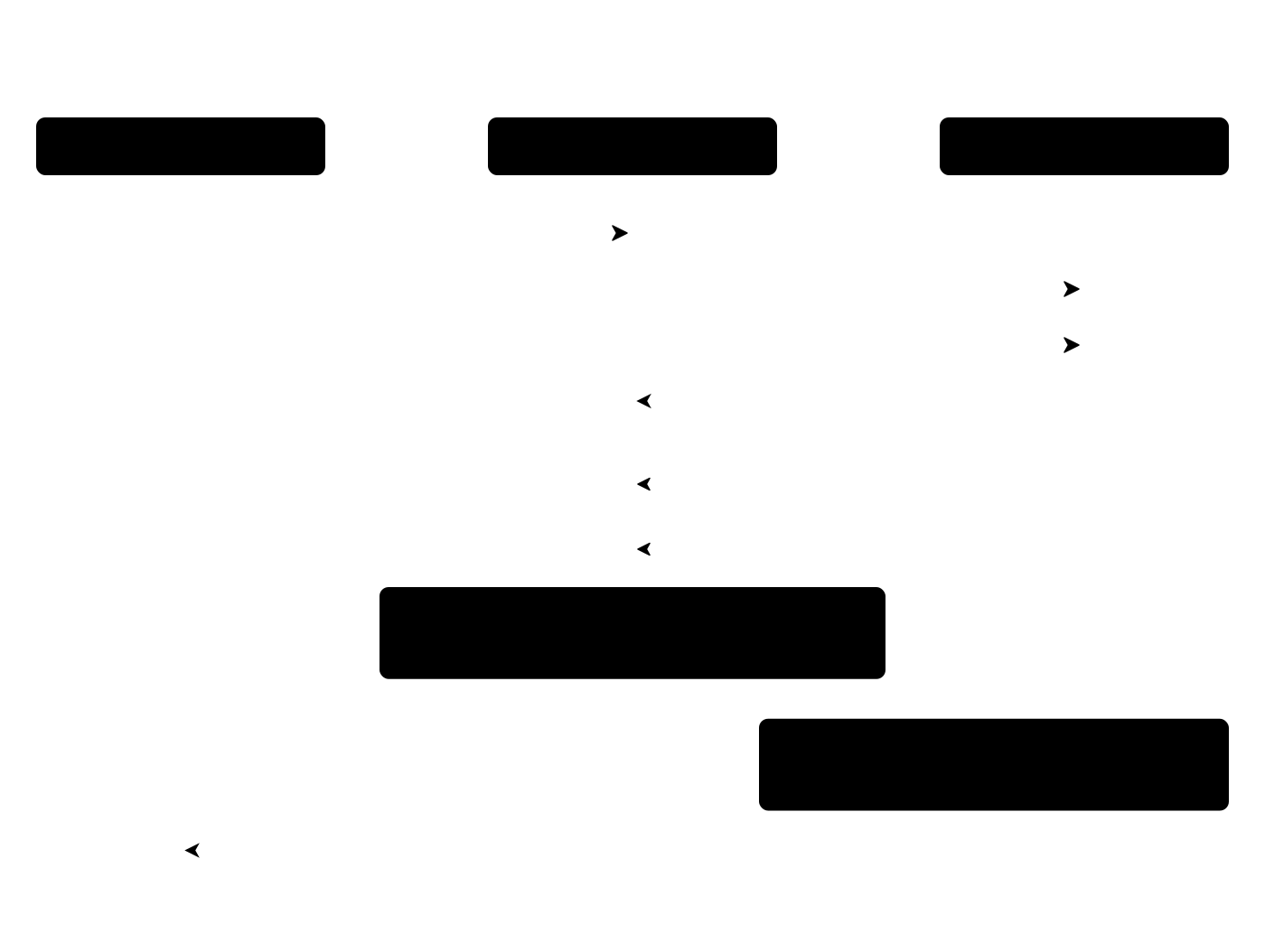
code          RbAmp                Backend             rbAmp module
  │             │                    │                       │
  ├─read_period_snapshot()►          │                       │
  │             ├─write_cmd(LATCH)──►│  t_now = time.monotonic()
  │             │                    │                       │
  │             │  sleep(50ms)       │                       │
  │             │                    │                       │
  │             ├─is_period_valid()─►│                       │
  │             │  → True            │                       │
  │             │                    │                       │
  │             ├─read_float_le(AVG_P0)►(4 reads)            │
  │             ├─read_float_le(MAX_P0)►(4 reads)            │
  │             ├─read_u32_le(LATCH_MS)►(4 reads)            │
  │             │                    │                       │
  │             │  dt = t_now − last_latch                    │
  │             │  energy.wh[ch] += avg_p[ch] × dt / 3600    │
  │             │  last_latch = t_now                         │
  │             │                    │                       │
  │◄─snap──────┤                    │                       │
The atomic snapshot on the module side guarantees that every measurement within a period lands in exactly one snapshot — no duplication, no losses at the period boundary.
Mapping to the direct register API
A table for those migrating from their own direct-access work:
Direct API (smbus2 / machine.I2C) |
Package equivalent |
|---|---|
Manual 4-byte read + struct.unpack |
dev.voltage (property) or dev.read_voltage() |
Per-channel read_byte × 4 |
dev.power[ch] (_ChannelProxy) or dev.read_power(ch) |
write_byte_data(0x50, 0x01, 0x27); time.sleep(0.05) |
dev.latch_period(); time.sleep(0.05) (or directly dev.read_period_snapshot()) |
Checking read_byte(0x07) & 1 |
dev.is_period_valid() or the snap.valid field |
Manual formula E_Wh += avg_p × dt / 3600 |
dev.energy.wh(0) — updated automatically |
| Manual current-sensor configuration via the direct register API | dev.set_sensor_class(cls) + dev.set_ct_model(code) — factory presets are loaded automatically |
What's next
- 02 · Module lines — which module line for which task
- 04 · Wiring — pull-ups, bus length, per-host wiring (RPi / ESP32 / RP2040 / STM32)
- 05 · Quickstart — the first working script for both backends
- 06 · Examples — a walkthrough of ready-made scenarios
- 09 · API Reference — every public class + method + property + exception
- 10 · Troubleshooting — when something doesn't work
Source & issues: rb-amp/rbamp-python · this page in the repo: docs/01_overview.md (v1.6.1)